
On-page SEO means improving the content and elements of a web page so people and search engines can understand it. That includes the copy, title, headings, images and internal links. Done well, it helps the page answer a search clearly and gives visitors a useful next step.
At a glance
- Start with the visitor’s task. A page should help someone learn, compare, choose or take action.
- Make the page specific and useful. Clear explanations, relevant examples and evidence are more valuable than repeated keywords.
- Prioritise the improvements that matter. Fix missing information and confusing page structure before polishing small details.
- Measure more than rankings. Look at relevant search traffic alongside enquiries, purchases or other meaningful actions.
Why does on-page SEO matter?
A visitor needs to recognise quickly whether your page can help them. Search engines also need to understand its subject and relevance.
Consider someone searching for a local repair service. A page that names the service but says little about availability, coverage or how to book leaves important questions unanswered. Adding the search phrase several more times won’t resolve those gaps.
On-page SEO helps you identify and address them. It connects what people search for with the information they need when they arrive.
It works alongside technical SEO, which helps search engines access and process your website, and activity outside your site, such as earning relevant links. Improving one area doesn’t remove the need to consider the others.
Start with what the searcher needs
Before changing a title or adding content, decide what the page is there to do.
Someone searching “what is on-page SEO” wants an explanation. Someone searching “SEO consultant Newcastle” may be comparing providers. Those searches call for different pages.
For each page, ask:
- Who is this for?
- What question or task brought them here?
- What information will help them move forward?
- What should they be able to do next?
Looking at current search results can help you understand the types of pages people are being shown. Use that as context, then consider what your own customers need and what your business can contribute.
Our guide to keywords in SEO explores how search language can inform your content.

Make the content useful enough to act on
Broad claims rarely help someone make a decision. A service page promising “excellent quality and outstanding results” still needs to explain what the service includes.
Useful details might include:
- Who the service is suitable for.
- What happens during the work.
- What affects the price or timescale.
- What the customer needs to provide.
- Relevant examples, limitations and common questions.
For a product page, the missing information might be dimensions, compatibility, materials or delivery arrangements. For an article, it might be a worked example that turns an explanation into something the reader can use.
A useful editing question is: what would someone still need to ask after reading this page? Answer the important questions without adding length for its own sake.

Write a clear title and main heading
The title tag and main heading have related jobs.
The title tag helps describe the page in browser tabs and can inform its title in search results. The main heading introduces the page to someone reading it. Google can generate a different search title using other page signals, so your chosen title isn’t guaranteed to appear unchanged. Google’s title guidance explains this process.
Consider this illustrative service-page example:
| Element | Vague version | More descriptive version |
|---|---|---|
| Title tag | Our Services — Example Company | Boiler Repairs in Newcastle — Example Company |
| Main heading | A service you can trust | Boiler repairs in Newcastle |
The descriptive version tells visitors what is offered and where. The rest of the page must support that promise.
Use natural language and avoid squeezing every keyword variation into the title.
Structure the page around real questions
Headings should help readers find the information they need.
A service page might use sections such as:
- What the service includes.
- Areas we cover.
- How booking works.
- What affects the cost.
- Common questions.
An article may need a definition, a process, examples and a checklist.
Use a clear main heading and organise supporting sections logically. Keep heading levels meaningful rather than choosing them only for their font size.
If two sections make essentially the same point, combine them. A shorter, clearer page can be more helpful than a longer page that repeats itself.

Write a description that sets the right expectation
A meta description summarises the page and can help someone decide whether to visit.
For our illustrative repair page, it could explain the service, location and next step:
Arrange a boiler repair in Newcastle. Find out which faults we handle, the areas we cover and how to book an appointment.
Only include claims the business can deliver. Don’t promise same-day appointments, fixed prices or free services unless those are accurate.
Google primarily creates snippets from page content and may use the meta description when it provides a suitable summary. That makes the on-page copy important too. Google’s snippet guidance covers how descriptions are selected.
Link to pages that help the reader
Internal links should connect the current topic with a useful next step.
An article explaining a technical problem might link to a deeper guide or a relevant service. A product page might link to compatible accessories or fitting instructions.
Use link text that describes the destination. “Explore our technical SEO services” gives more context than “click here”. Keep links relevant and avoid adding them simply to reach a target number. Google recommends descriptive, contextual links.
For example, if you need to investigate issues across your whole website, a website audit is a more appropriate next step than editing one page in isolation.
Make images informative and accessible
Choose images that help explain the page. A real product detail, annotated screenshot or process diagram can answer questions that text alone leaves unclear.
For informative images, write alternative text that describes their relevant meaning. For example, a photograph showing a product’s wall-mounting bracket needs a different description from a general product photograph.
Avoid filling alt text with keywords. Purely decorative images should usually have an empty alt attribute so assistive technology can skip them.
Also check image file sizes, mobile presentation and whether space is reserved while images load. These affect how comfortably people can use the page. Google’s image guidance covers image context and descriptive alt text.
Support your advice with evidence
Where possible, show the experience behind the content.
That might mean explaining why you chose a particular approach, demonstrating a process with screenshots, or sharing a client example with permission. Identify the author and support important factual claims with reliable sources.
Google uses the term E-E-A-T for experience, expertise, authoritativeness and trustworthiness. It isn’t a single ranking factor or a score you can increase by adding an author biography. The practical question is whether readers have good reasons to trust the information. Google’s helpful-content guidance explains the distinction.
Decide what to improve first
Start with a page that matters to your business and has a clear opportunity for improvement.
| What you notice | What to investigate |
|---|---|
| The page attracts searches unrelated to its purpose | Whether its topic, wording and intended audience are clear |
| Relevant impressions but few clicks | The search queries, position, title and competing results |
| Visitors arrive but rarely enquire or buy | Missing information, suitability, usability and the next step |
| Several pages provide almost identical answers | Whether each has a distinct purpose or should be consolidated |
| Important information is outdated | Accuracy, examples, availability and links |
These are starting points for investigation, not automatic diagnoses. Low clicks, for example, can reflect a low search position rather than a poorly written title.
Check whether the changes are helping
Record what you changed and when. Use Search Console to review the page’s queries, impressions and clicks, and use your analytics to assess relevant actions.
Allow enough time and traffic to make the comparison useful. Seasonality, demand and other website changes can affect the results, so avoid attributing every movement to your latest edit.
The aim is to understand whether the page is attracting an appropriate audience and helping that audience take the next step.
An article update in practice
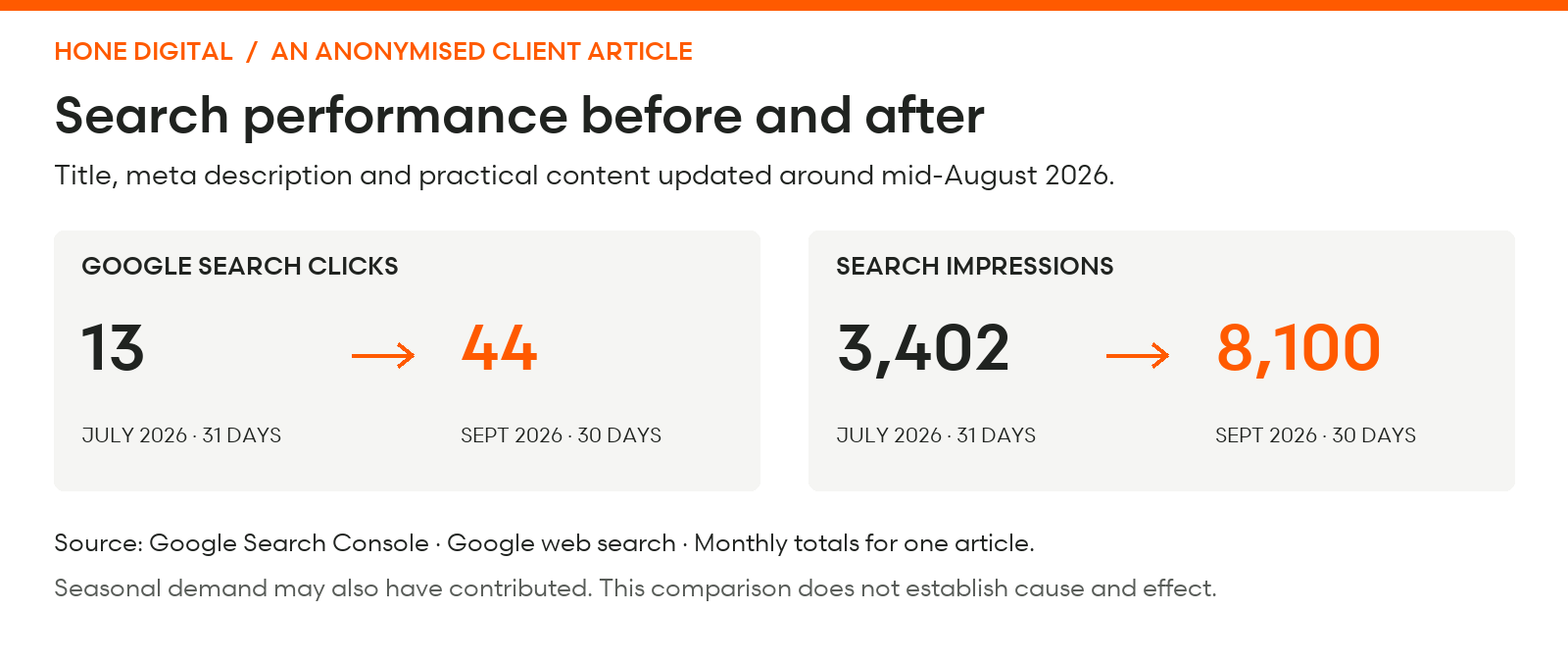
For a client’s informational article, we revised the title and meta description and added practical tips to the content around mid-August 2026.
Google Search Console recorded 13 clicks and 3,402 impressions in July, compared with 44 clicks and 8,100 impressions in September. These are Google web-search totals for this article, comparing a full month before the update with a full month afterwards. August is excluded as the transition month.
A practical on-page SEO checklist
Before finishing your review, check that:
- The page has a clear purpose and intended audience.
- The opening explains what visitors will find.
- The content answers the important questions accurately.
- The title and headings describe the page clearly.
- Examples and evidence support the main points.
- Internal links lead to relevant, useful pages.
- Images are appropriate, accessible and usable on mobile.
- The next step is easy to understand and complete.
Start with the gaps that prevent someone from understanding your offer or making a decision. That gives your optimisation work a clear business purpose.